myAppSerial
Bene siamo arrivati alla nostra prima applicazione grafica.
Partiamo copiando la nostra prova myTry01 del modulo l01_startGtk
Modifichiamo la configurazione in conf=0x0010 perchè non ci servono i box:
- application
- global
- main
- menu
- status
myTry01
Aggiungiamo l’ istanza del nostro device seriale con relativa configurazione.
Questa potete copiarla da myTry01 del modulo myProtocol.
#-----------------------------------------------------------------------------
# myTry
#-----------------------------------------------------------------------------
def myTry01(deb=1):
	""" + window (self)
	"conf                                       .------------------------.
	"0001 - aBox            (h application)     | application            |
	"0002   - gBox            (h global)        |   .--------------------.
	"0004   - mBox            (v main)          |   | g | m | menu       |
	"0008     - uBox            (h menu)        |   | l | a .------------.
	"0010     - bBox            (v body)        |   | o | i | body       |
	"0020     - sBox            (h status)      |   | b | n |            |
	"                                           |   | a |   .------------.
	"                                           |   | l |   | status     |
	"                                           .---.---.----------------.
	"""
	# istanza l'applicazione base (no application, global, main, menu, status)
	self = MyApp(width=400, height=400, title="myApp",
					center=True, color="#bbb", conf=0x0010, show=0)


	# inizializzazione in base al S.O.
	if sys.platform == 'win32':
		# Windows (numerazione parte da 1)
		por = "COM"
		par = ['1','115200','8','N','1']
	else:
		# Unix  (numerazione parte da 0)
		#por = "/dev/ttyS"
		#por = "/dev/ttymxc"
		por = "/dev/ttyUSB"
		par = ['0','115200','8','N','1']

	#  istanza di un seriale
	dev = MySerial(por=por, par=par, ope=1, deb=deb)

	if dev.ser:
	# if 1:
		print "device Ok"
		self.dev = MyProtocol(ser=dev, sta='', sto=['\r','\n'], hex=0, cal=None)
		# contatore di errori
		self.dev.couErr = 0
		# istanza il Parser
		self.dev.prs = MyParser()
		# attivo il parser
		self.dev.cal = self.dev.prs.parser

		# re-imposta il titolo dell'applicazione
		self.set_title(self.title + " %s %s %s" %(self.dev.ser.por, self.dev.ser.par[1:], myRev) )

		return self
	else:
		print "device Ko"
		sys.exit()
myTry01 la useremo come base di partenza per avere la struttura base della nostra applicazioen Gtk.
Per finire notare che abbiamo cambiato il titolo della nostra applicazione aggiungendo la revisione e la configurazione come promemoria.
		# re-imposta il titolo dell'applicazione
		self.set_title(self.title + " %s %s %s" %(self.dev.ser.por, self.dev.ser.par[1:], myRev) )
myTry02
In myTry02 viene definita la nostra GUI personale.
def myTry02(self):
	"GUI (Graphics User Interface)"

	from my01Box import myFrame
	from my02TxtView import myTxtView
	from my02Entry import myEntFrame, myEntList
	from my02Label import myLabFrame
	from my03Button import myButton, myButFrame
	from my03ChkButton import myChkButton
#myTxtView
	#          0,   1,   2,   3,   4,    5,    6,       7
	# fram,[labe,xBox,buff,text,cTag,clear,write,writeTag]
	fram,othe = myTxtView(name='logBuffer', colo="black",
							widt=400, heig=400,
							font="courier 9", edit=False,
							left=1, righ=1, bord=3,
							bFra=1, sFra=Gtk.SHADOW_ETCHED_OUT, tFra='v' )
	# insert object in apllication
	self.bBox.pack_start(fram, False, False, 1)

	# referenzio gli attributi
	self.cTag = othe[4]
	# referenzio i metodi
	self.clear = othe[5]
	self.write = othe[6] # *msg
	self.wriTg = othe[7] # str="", tag="blaWhi"

	# redefine self.wriTg in protol
	self.dev.wriTg = self.wriTg

	# redirect sul proprio buffer text
	sys.stdout = self

##############################################################################
# Device

	# self.start = time()

	self.debLog = 1
	self.bufDev = 0
	self.couRcv = 0
	self.couSnd = 0
	self.couFil = 0
	self.namFil = ""
	def devRx(self):
		# if self.chkEna.get_active():
		if 1:
			# ricevo dati
			try:
				# lettura dati
				data = self.dev.read()
				# if data:
				# 	# aggiorno bytes ricevuti
				# 	self.couRcv += len(data)
				# 	self.labRcv.set_text(" %d" %self.couRcv)

				# 	# print data,
				# 	self.write(data)
				# 	# clear data rx
				# 	self.dev.prs.data = None

			except Exception,err:
				if "DEV read error" in err:
					pass
				else:
					pass
					self.dev.couErr += 1
					print "err:", self.dev.couErr, err
		sleep(0.001)
		# rimane attivo
		return True

	# referenzio il metodo che inserisco nel loop di Idle
	self.rxDev = GObject.idle_add(devRx, self)

	def devTx(self):
		# invio dati
		try:
			# send parameters
			if self.bufDev:

				# print data_str
				self.dev.sendListCommands(self.bufDev, sto="", log=1)
				self.bufDev = []

				self.couSnd +=1
				self.labSnd.set_text(" %d" %self.couSnd)
			else:
				pass

		except:
			if self.debLog:
				print("MyDevice write Frame error")

		# visualizzo tempo trascorso
		# print "tim:%s" %(time() - self.start)

		sleep(0.001)
		# rimane attivo
		return True

	# referenzio il metodo che inserisco nel loop di Idle
	self.txDev = GObject.idle_add(devTx, self)

##############################################################################
#myFrame (Tx Commands)
	# fram,[labe,xBox]
	obje, othe = myFrame(name='Tx commands', obje=None, colo='black',
						bord=2, shad=Gtk.SHADOW_ETCHED_OUT,
						tBox='h', aBox=[False, False, 10])
	# referenzio l'oggetto
	self.boxCmd = othe[1]
	# change background color to Class
	chaBackColor(obj=obje, css="boxCmd", col="#a0a0a0")

	# insert object in application
	self.bBox.pack_start(obje, False, False, 1)

#myLabFrame (counter Tx data)
	#fram, [labe, lFrm, xBox]
	obje, othe = myLabFrame(name='0',
							leng=len('0')+1, prea=' ', post='',
							font='Arial 10',
							colo='blue',
							nFra='Tx.data', cFra='black', bFra=1, sFra=Gtk.SHADOW_ETCHED_OUT,
							tFra='h', aFra=[False, False, 1])
	# referenzio l'oggetto
	self.labSnd = othe[0]
	# insert object in application
	self.boxCmd.pack_start(obje, False, False, 1)

#myEntFrame (cmd Serial)
	# ridefinisco la callback
	def on_activate(widg, *data):
		data_str = widg.get_text()
		# CR
		if self.chkCR.get_active():
			data_str += '\r'
		# LF
		if self.chkLF.get_active():
			data_str += '\n'
		# convert to list
		data_str = [data_str,]

		# send data
		if data_str:
			# print data_str
			# self.dev.prot.sendListCommands(data_str, sto="", log=0)
			self.bufDev = data_str
			# printHex(data_str[0])

	#fram, [labe, xBoxcmdB, entr, call]
	obje, othe = myEntFrame(name='',
							numb=29,
							call=on_activate, data=[],
							nFra='cmd.Serial', bFra=1, sFra=Gtk.SHADOW_ETCHED_OUT,
							tFra='h', aFra=[False, False, 1])
	# referenzio l'oggetto
	self.entCmdSerial = othe[2]
	# insert object in application
	self.boxCmd.pack_start(obje, False, False, 1)

#myChkButton (enable CR)
	# ridefinisco la callback
	def on_clicked(widg, name, *data):
		pass
	# butt, call
	obje, othe = myChkButton(name='Ena',
							valu=1, colo='black',
							call= on_clicked, data=['-',])
	# referenzio l'oggetto
	self.chkCR = obje
	# fram,[labe,xBox]
	obj1, oth1 = myFrame(name='CR', obje=obje, colo='black',
						 bord=2, shad=Gtk.SHADOW_ETCHED_OUT,
						 tBox='h' )
	# insert object in application
	self.boxCmd.pack_start(obj1, False, False, 1)

#myChkButton (enable LF)
	# ridefinisco la callback
	def on_clicked(widg, name, *data):
		pass
	# butt, call
	obje, othe = myChkButton(name='Ena',
							valu=1, colo='black',
							call= on_clicked, data=['-',])
	# referenzio l'oggetto
	self.chkLF = obje
	# fram,[labe,xBox]
	obj1, oth1 = myFrame(name='LF', obje=obje, colo='black',
						 bord=2, shad=Gtk.SHADOW_ETCHED_OUT,
						 tBox='h' )
	# insert object in application
	self.boxCmd.pack_start(obj1, False, False, 1)

#myChkButton (enable Debug)
	# ridefinisco la callback
	def on_clicked(widg, name, *data):
		self.dev.ser.deb = widg.get_active()
	# butt, call
	obje, othe = myChkButton(name='Ena',
							valu=0, colo='black',
							call= on_clicked, data=['-',])
	# referenzio l'oggetto
	self.chkDeb = obje
	# fram,[labe,xBox]
	obj1, oth1 = myFrame(name='Deb', obje=obje, colo='black',
						 bord=2, shad=Gtk.SHADOW_ETCHED_OUT,
						 tBox='h' )
	# insert object in application
	self.boxCmd.pack_start(obj1, False, False, 1)

#myChkButton (enable RTS)
	# ridefinisco la callback
	def on_clicked(widg, name, *data):
		if widg.get_active():
			self.dev.ser.ser.setRTS(1)
		else:
			self.dev.ser.ser.setRTS(0)
	# butt, call
	obje, othe = myChkButton(name='On',
							valu=1, colo='black',
							call= on_clicked, data=['-',])
	# referenzio l'oggetto
	self.chkRts = obje
	# fram,[labe,xBox]
	obj1, oth1 = myFrame(name='Rts', obje=obje, colo='black',
						 bord=2, shad=Gtk.SHADOW_ETCHED_OUT,
						 tBox='h' )
	# insert object in application
	self.boxCmd.pack_start(obj1, False, False, 1)

#myChkButton (enable DTR)
	# ridefinisco la callback
	def on_clicked(widg, name, *data):
		if widg.get_active():
			self.dev.ser.ser.setDTR(1)
		else:
			self.dev.ser.ser.setDTR(0)
	# butt, call
	obje, othe = myChkButton(name='On',
							valu=1, colo='black',
							call= on_clicked, data=['-',])
	# referenzio l'oggetto
	self.chkDtr = obje
	# fram,[labe,xBox]
	obj1, oth1 = myFrame(name='Dtr', obje=obje, colo='black',
						 bord=2, shad=Gtk.SHADOW_ETCHED_OUT,
						 tBox='h' )
	# insert object in application
	self.boxCmd.pack_start(obj1, False, False, 1)
Logger
Il primo widget inserito è un myTxtView che lo useremo come logger della nostra applicazione. Qui vedremo i nostri Tx e Rx.
#myTxtView
	#          0,   1,   2,   3,   4,    5,    6,       7
	# fram,[labe,xBox,buff,text,cTag,clear,write,writeTag]
	fram,othe = myTxtView(name='logBuffer', colo="black",
							widt=400, heig=400,
							font="courier 9", edit=False,
							left=1, righ=1, bord=3,
							bFra=1, sFra=Gtk.SHADOW_ETCHED_OUT, tFra='v' )
	# insert object in apllication
	self.bBox.pack_start(fram, False, False, 1)

	# referenzio gli attributi
	self.cTag = othe[4]
	# referenzio i metodi
	self.clear = othe[5]
	self.write = othe[6] # *msg
	self.wriTg = othe[7] # str="", tag="blaWhi"

	# redefine self.wriTg in protol
	self.dev.wriTg = self.wriTg

	# redirect sul proprio buffer text
	sys.stdout = self
Notate che abbiamo fatto un redirect per indirizzare lo stdout nel nostro logger. Questo avviene perchè abbiamo mantenuto la compatibilità delle chiamate.
Device
La seconda sezione viene enfatizzata da un commento per aumentare la leggibilità.
##############################################################################
# Device

	# self.start = time()

	self.debLog = 1
	self.bufDev = 0
	self.couRcv = 0
	self.couSnd = 0
	self.couFil = 0
	self.namFil = ""
	def devRx(self):
		# if self.chkEna.get_active():
		if 1:
			# ricevo dati
			try:
				# lettura dati
				data = self.dev.read()
				# if data:
				# 	# aggiorno bytes ricevuti
				# 	self.couRcv += len(data)
				# 	self.labRcv.set_text(" %d" %self.couRcv)

				# 	# print data,
				# 	self.write(data)
				# 	# clear data rx
				# 	self.dev.prs.data = None

			except Exception,err:
				if "DEV read error" in err:
					pass
				else:
					pass
					self.dev.couErr += 1
					print "err:", self.dev.couErr, err
		sleep(0.001)
		# rimane attivo
		return True

	# referenzio il metodo che inserisco nel loop di Idle
	self.rxDev = GObject.idle_add(devRx, self)

	def devTx(self):
		# invio dati
		try:
			# send parameters
			if self.bufDev:

				# print data_str
				self.dev.sendListCommands(self.bufDev, sto="", log=1)
				self.bufDev = []

				self.couSnd +=1
				self.labSnd.set_text(" %d" %self.couSnd)
			else:
				pass

		except:
			if self.debLog:
				print("MyDevice write Frame error")

		# visualizzo tempo trascorso
		# print "tim:%s" %(time() - self.start)

		sleep(0.001)
		# rimane attivo
		return True

	# referenzio il metodo che inserisco nel loop di Idle
	self.txDev = GObject.idle_add(devTx, self)
Qui abbiamo creato 2 metodi devRx e devTx per automatizzare l’aggiornamento. Li abbiamo aggiunti al loop di idle così verranno richiamati quando non vi sono altre priorità.
	# referenzio il metodo che inserisco nel loop di Idle
	self.rxDev = GObject.idle_add(devRx, self)
	# referenzio il metodo che inserisco nel loop di Idle
	self.txDev = GObject.idle_add(devTx, self)
Tx
Per finire abbiamo aggiunto una sezione per la gestione delle nostre trasmissioni.
##############################################################################
#myFrame (Tx Commands)
	# fram,[labe,xBox]
	obje, othe = myFrame(name='Tx commands', obje=None, colo='black',
						bord=2, shad=Gtk.SHADOW_ETCHED_OUT,
						tBox='h', aBox=[False, False, 10])
	# referenzio l'oggetto
	self.boxCmd = othe[1]
	# change background color to Class
	chaBackColor(obj=obje, css="boxCmd", col="#a0a0a0")

	# insert object in application
	self.bBox.pack_start(obje, False, False, 1)

#myLabFrame (counter Tx data)
	#fram, [labe, lFrm, xBox]
	obje, othe = myLabFrame(name='0',
							leng=len('0')+1, prea=' ', post='',
							font='Arial 10',
							colo='blue',
							nFra='Tx.data', cFra='black', bFra=1, sFra=Gtk.SHADOW_ETCHED_OUT,
							tFra='h', aFra=[False, False, 1])
	# referenzio l'oggetto
	self.labSnd = othe[0]
	# insert object in application
	self.boxCmd.pack_start(obje, False, False, 1)

#myEntFrame (cmd Serial)
	# ridefinisco la callback
	def on_activate(widg, *data):
		data_str = widg.get_text()
		# CR
		if self.chkCR.get_active():
			data_str += '\r'
		# LF
		if self.chkLF.get_active():
			data_str += '\n'
		# convert to list
		data_str = [data_str,]

		# send data
		if data_str:
			# print data_str
			# self.dev.prot.sendListCommands(data_str, sto="", log=0)
			self.bufDev = data_str
			# printHex(data_str[0])

	#fram, [labe, xBoxcmdB, entr, call]
	obje, othe = myEntFrame(name='',
							numb=29,
							call=on_activate, data=[],
							nFra='cmd.Serial', bFra=1, sFra=Gtk.SHADOW_ETCHED_OUT,
							tFra='h', aFra=[False, False, 1])
	# referenzio l'oggetto
	self.entCmdSerial = othe[2]
	# insert object in application
	self.boxCmd.pack_start(obje, False, False, 1)

#myChkButton (enable CR)
	# ridefinisco la callback
	def on_clicked(widg, name, *data):
		pass
	# butt, call
	obje, othe = myChkButton(name='Ena',
							valu=1, colo='black',
							call= on_clicked, data=['-',])
	# referenzio l'oggetto
	self.chkCR = obje
	# fram,[labe,xBox]
	obj1, oth1 = myFrame(name='CR', obje=obje, colo='black',
						 bord=2, shad=Gtk.SHADOW_ETCHED_OUT,
						 tBox='h' )
	# insert object in application
	self.boxCmd.pack_start(obj1, False, False, 1)

#myChkButton (enable LF)
	# ridefinisco la callback
	def on_clicked(widg, name, *data):
		pass
	# butt, call
	obje, othe = myChkButton(name='Ena',
							valu=1, colo='black',
							call= on_clicked, data=['-',])
	# referenzio l'oggetto
	self.chkLF = obje
	# fram,[labe,xBox]
	obj1, oth1 = myFrame(name='LF', obje=obje, colo='black',
						 bord=2, shad=Gtk.SHADOW_ETCHED_OUT,
						 tBox='h' )
	# insert object in application
	self.boxCmd.pack_start(obj1, False, False, 1)

#myChkButton (enable Debug)
	# ridefinisco la callback
	def on_clicked(widg, name, *data):
		self.dev.ser.deb = widg.get_active()
	# butt, call
	obje, othe = myChkButton(name='Ena',
							valu=0, colo='black',
							call= on_clicked, data=['-',])
	# referenzio l'oggetto
	self.chkDeb = obje
	# fram,[labe,xBox]
	obj1, oth1 = myFrame(name='Deb', obje=obje, colo='black',
						 bord=2, shad=Gtk.SHADOW_ETCHED_OUT,
						 tBox='h' )
	# insert object in application
	self.boxCmd.pack_start(obj1, False, False, 1)

#myChkButton (enable RTS)
	# ridefinisco la callback
	def on_clicked(widg, name, *data):
		if widg.get_active():
			self.dev.ser.ser.setRTS(1)
		else:
			self.dev.ser.ser.setRTS(0)
	# butt, call
	obje, othe = myChkButton(name='On',
							valu=1, colo='black',
							call= on_clicked, data=['-',])
	# referenzio l'oggetto
	self.chkRts = obje
	# fram,[labe,xBox]
	obj1, oth1 = myFrame(name='Rts', obje=obje, colo='black',
						 bord=2, shad=Gtk.SHADOW_ETCHED_OUT,
						 tBox='h' )
	# insert object in application
	self.boxCmd.pack_start(obj1, False, False, 1)

#myChkButton (enable DTR)
	# ridefinisco la callback
	def on_clicked(widg, name, *data):
		if widg.get_active():
			self.dev.ser.ser.setDTR(1)
		else:
			self.dev.ser.ser.setDTR(0)
	# butt, call
	obje, othe = myChkButton(name='On',
							valu=1, colo='black',
							call= on_clicked, data=['-',])
	# referenzio l'oggetto
	self.chkDtr = obje
	# fram,[labe,xBox]
	obj1, oth1 = myFrame(name='Dtr', obje=obje, colo='black',
						 bord=2, shad=Gtk.SHADOW_ETCHED_OUT,
						 tBox='h' )
	# insert object in application
	self.boxCmd.pack_start(obj1, False, False, 1)
Come potete vedere abbiamo inserito la possibilità di abilitare il fine linea LF e il ritorno carrello CR nelle nostre TX.
Per test ho inserito anche la possibilità di modificare lo stato dei segnali RTS e DTR
Per finire ho aggiunto un contatore delle nostre trasmissioni Tx.Data
main
Il nostro main richiama le 2 definizioni myTryXX e per dimostrazione aggiunge 2 trasmissioni.
		# istanza l'Applicazione (MyApp)
		# inizializza il device seriale
		self = myTry01(0)
		myTry02(self)

		# test: invio un comando in apertura
		self.dev.sendListCommands(["cmd_1",], sto="\r")

		# delay richiesta ritardata
		GLib.timeout_add(600, self.dev.sendListCommands, ["cmd_2",], sto="\r")
Se proviamo ad avviare il nostro script vedremo:
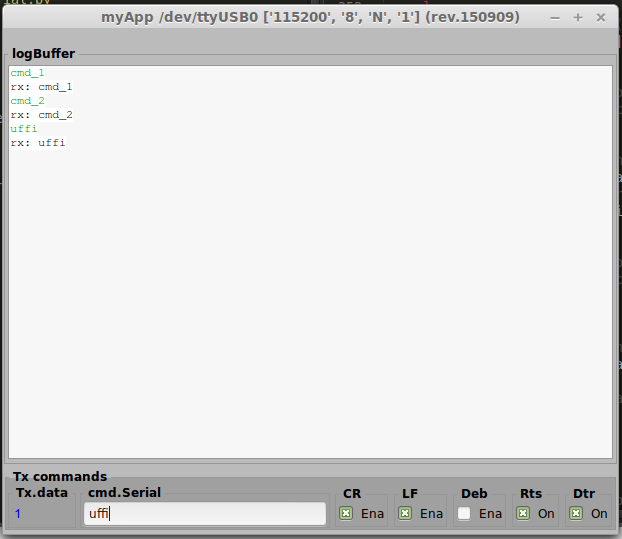
myAppSerial in esecuzione.
Come potete notare appaiono le 3 trasmissione Tx/Rx.
Tx viene enfatizzata dal colore verde.
Rx viene enfatizzata dal prepost rx:
Le prime 2 trasmissioni sono automatiche da codice.
		# test: invio un comando in apertura
		self.dev.sendListCommands(["cmd_1",], sto="\r")

		# delay richiesta ritardata
		GLib.timeout_add(600, self.dev.sendListCommands, ["cmd_2",], sto="\r")
La terza l’ abbiamo fatta noi tramite il widget cmd.Serial.
Package
La struttura aggiornata del nostro package è la seguente:
myAppSerial/
  l00_start.py
  l01_startGtk.py
  my00init.py
  myAppSerial.py
  myLib/
    __init__.py
    myProtocol/
      __init__.py
      my00init.py
      myProtocol.py
      mySerial.py
Per scaricare la nuova versione 20150909.zip
Nota
Ricordatevi di fare il loop TX<->Rx sulla seriale e di impostare la porta giusta del vostro device su myTry01!
Saluti
Per oggi mi fermo qui.
Nel prossimo post aggiungeremo alla nostra GUI altre caratteristiche.
Ciao alla prossima. (stay tune!)